My problem is NOT the same as those reported earlier that look similar. Now, that said …
For a couple of weeks, every now and then one outgoing email gets stuck in my outgoing mail folder. In between, many other emails go out and appear next in the sent folder - as one would expect. But that one doesn’t.
What this shows is that server config was correct, remained correct, and still is correct.
Checking the stuck email, there is nothing wrong with it, plain text, correct address, may be a photo attached … nothing unusual.
It happens in new emails, as well as when I respond to an incoming email.
A stuck email cannot be forced by clicking on “send now”.
Would anybody have the slightest idea why or how this can happen ?
Can you confirm you don’t see “Retries exceeded” in Androids notification shade when syncing an account that has a message “stuck” in outbox, as shown in Mail sits in outbox - #2 by slyphnoyde
Have you tried moving stuck emails from outbox to drafts and sending it again. If so, does it successfully send or remain in outbox?
Do your email(s) stuck in outbox have multiple pictures or large attachments?
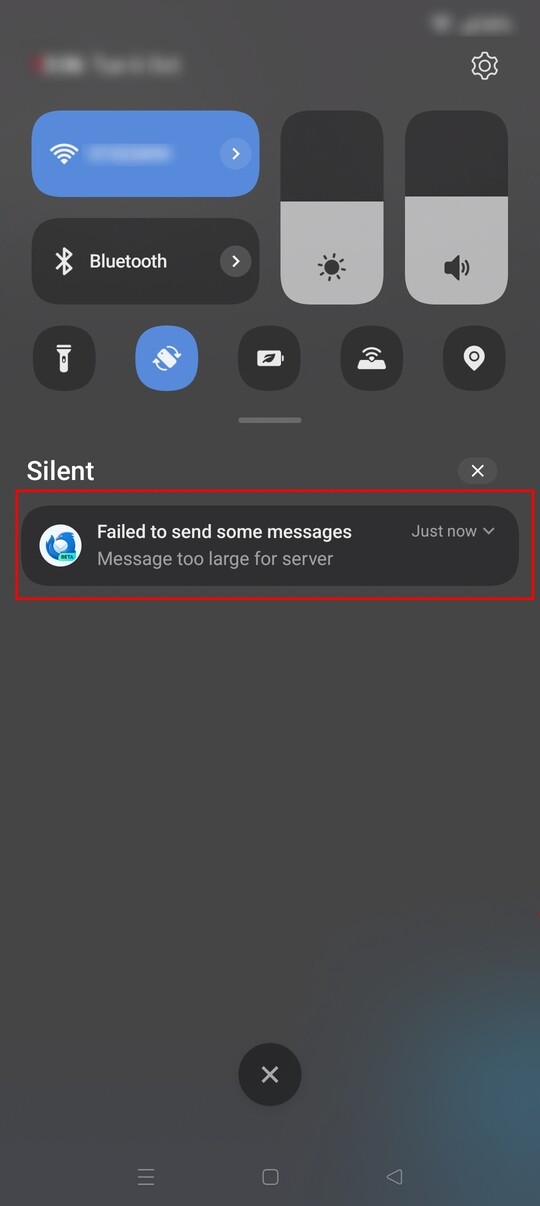
An email can remain in outbox if the message is larger than the mail servers advertised limit. K9 checks this limit before sending emails with attachments. If exceeded, it displays a silent notification (shown below) and marks the email as a permanent send failure.
Such an email can only be sent after reducing its size otherwise it will always fail.
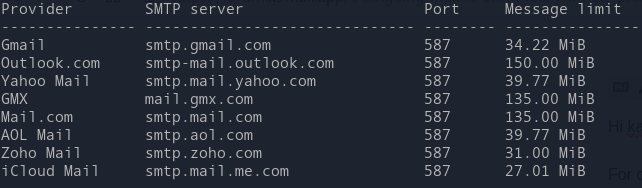
I’ve checked the smtp size limits advertised by some common providers below. Note that this is max message size. Attachments would need to be smaller to allow for message text and overhead.
b) “back into drafts and send again” has worked once or twice, but is not consistently
c) and finally my mail service provider has no such limits (and my attachments are anyway a meager few hundred kilobytes), and there was never more than 1 image attached, I am sure of that. In fact there were emails without any attachment which got stuck.
One other hint : it has happened that I sent 3 or 4 email together or within the minute, and the one in the middle got stuck, while first and last went out just fine. Of course all three to different receivers, but all addresses were carefully checked and correct.
There’s not enough information to suggest other possible causes.
Do you observe any error messages or silent notifications at the time when sent email(s) get stuck or while synchronising an account containing a stuck email?
Is there any steps or actions you take that reliably produced a stuck email? This would help others try and reproduce the issue.
For example, maybe you have a different method for adding attachments such as pressing share from your photo gallery rather than pressing the attach button in TB-A?
The more information you can provide, the greater chance there is to identify the cause.
There are many reports on Github about emails being stuck in outbox. Some because the error message has not clearly articulated the reason or prominently displayed (silent notification), others relate to the sync mechanism that fails to recover from no network state, as mentioned by a maintainer below. TB have a milestone created to refactor the sync mechanism.
If the email didn’t send, move the stuck email to drafts.
Resent the email.
Save the debug log.
Add your findings, along with your observations and steps to the above Github ticket.
If you have technical experience and able to review the log, it may give pointers on the cause.