I had to reset my phone: Pixel 4a. After reinstallation of K9 mail and import of settings the app displayed all of my four different mail accounts but no mail folders associated with them. Just the OUTBOX was shown. No other folders. Not even a choice of standard folders like Inbox, Drafts etc.
I am working with IMAP accounts from two different mail servers.
I couldn’t solve this but suddenly - after 2 or 3 days - it worked although I cannot remember to have changed anything during this waiting period.
Now I have to set up a new Google Pixel 10a. And there’s the same problem.
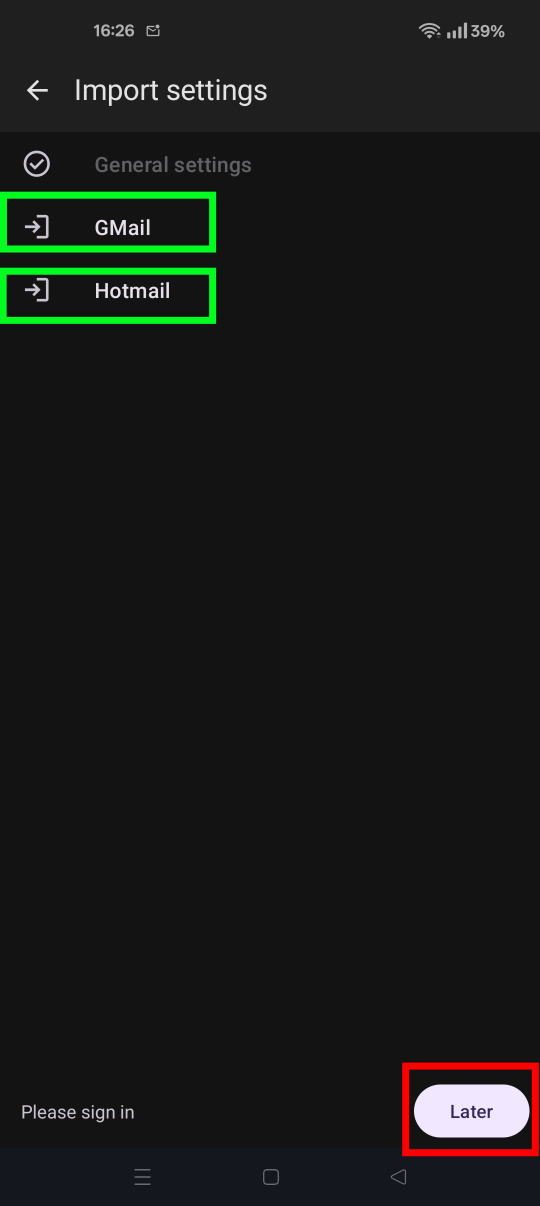
Seeing only the Outbox folder occurs when you skip the oAuth sign-in process during account import. You likely tapped the “later” button at the bottom, rather that pressing each account name in turn and completing your email provider’s oAuth sign-in flow. See screen shot below.
There’s two ways to resolve.
a. Finish setting up the accounts you imported.
Navigate to settings > account name > fetching mail > incoming server
Click next
Click the “Sign in with [provider name]” button.
Login and grant K9 the requested permissions.
Navigate to settings > account name > sending mail > outgoing server
Repeat step 2 to 4
b. Reinstall the app, import your accounts and sign-in to each in turn.
All mail accounts are now working with K9 mail although I did not change any settings since they were correct anyhow. I just had to wait for some hours. Very strange!
Glad you resolved the issue. Out of interest, do you have the local folder size set high for the mail.de account. Settings > account > fetching mail > local folder size. Default = 25 messages.
I’m wondering if the delay is due to a large number of emails synchronising during the accounts setup.